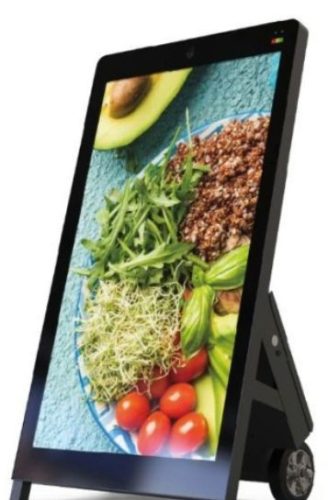
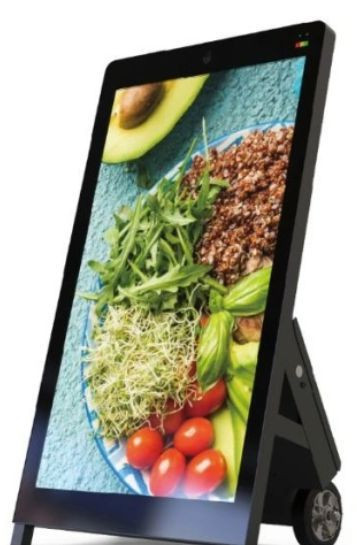
What are the technical specifications of RS55PDSODB2500PCAP?
- Diagonal size: 55" (a-Si TFT-LCD, S-IPS)
- Resolution: 1920 (RGB) × 1080, FHD, 51 ppi, RGB vertical stripe
- Brightness: 2500 cd/m² (Typ.)
- Contrast: 1100:1 (typ.)
- Response time: 12 ms (typ.) (Tr + Td)
- Viewing angle: 89/89/89 (min.) (CR ≥ 10) left/right/up/down
- Frame rate: 60 Hz
- Display area: 941.184 × 529.416 mm
- Appearance size: 963.6 × 567.9 × 29.6 mm
- Opening area: 945.8 × 534.02 mm
- Surface: haze 1%, hard coating (3H)
- Panel interface: 51 pins LVDS (2 CH, 8-bit), terminal
- Panel supply: 12.0V (typ.)
- Operating temperature: 0–50 °C
- Storage temperature: -20–60 °C
- Protection: IP65
- Form factor: open frame
- LCD interface: HDMI
- Playback: Android (RAM 2G + ROM 16G)
- Touch: PCAP touchscreen
- Weight: 18 kg/pcs (panel weight: 7.50 kg typ.)
- Mobility: rechargeable lithium battery, ~12 hours; charge level indicator; rubber pulleys
Where does a 55" high-brightness battery display add value in customer communication?
The RS55PDSODB2500PCAP is designed for locations where content must remain readable under strong ambient light and where repositioning is frequent. 2500 nits helps keep pricing, wayfinding, queue guidance and promotional visuals visible near windows, glazed entrances or well-lit halls. Battery operation reduces dependency on fixed power points, so you can deploy the screen for pop-up events, seasonal campaigns or temporary service points without rewiring.
How do PCAP touch and Android playback support interactive content?
PCAP touch provides fast, precise control for interactive navigation, selection and form-based workflows, which is helpful when visitors need to browse offers, select services or find information quickly. Android playback (RAM 2G + ROM 16G) simplifies media scheduling and updates, letting you roll out new visuals, playlists or web-based content without complicated infrastructure. This also supports standardized rollouts across multiple sites, using the same content logic and update routine.
What does IP65 and a 0–50 °C operating range mean for reliability?
IP65 protection helps in environments exposed to dust and frequent cleaning, and it adds confidence when the display is placed in high-traffic areas. The specified 0–50 °C operating range and the high-temperature-resistant panel are important when the display is installed near entrances or sunlit surfaces, where thermal load can rise. Good placement, airflow and planned cleaning routines further improve stability and reduce unexpected downtime.
Selection criteria: what to check before choosing a portable high-brightness display
- Brightness level: for strong ambient light, 2000+ nits is often the practical threshold for clear readability.
- Resolution and content type: Full HD is a good fit for menus, signage, pricing and standard video assets at 55".
- Interactivity: PCAP touch is essential if you plan on interactive navigation rather than passive playback.
- Protection level: IP-rated designs are beneficial for dusty zones and frequent wipe-down cleaning.
- Mobility: battery endurance, charge indicator, stable wheels and safe moving workflow.
- Integration: HDMI and Android playback enable quick commissioning and consistent media management.
- Operating conditions: temperature, placement near windows, airflow, and expected duty cycle.
Why do quality, local technical support, service and planned maintenance matter?
For B2B deployments, value comes from predictable uptime and consistent presentation quality. Correct commissioning, local technical support and planned maintenance reduce risk, protect project timelines and keep total cost of ownership under control. In practice, focus on:
- Safe moving and positioning: minimize impacts during relocation and define a simple handling routine.
- Thermal management: maintain airflow and avoid placing the screen directly next to heat sources.
- Cleaning process: use touch- and glass-safe cleaning materials to protect coatings and clarity.
- Software routine: plan Android updates and content change control so rollouts stay consistent.
Procurement flexibility: supply, logistics and payment options that keep projects on track
On multi-site deployments, procurement planning can be as critical as the display itself. These options help you align delivery with installation and finance workflows:
- Stock availability for fast dispatch when timelines are tight.
- Scheduled inbound delivery to match site readiness and installation windows.
- Selectable shipping methods to balance lead time and cost.
- Customs handling and freight forwarding support for cross-border projects.
- Post-payment terms and invoicing in foreign currency to match corporate processes.
- Project-tailored quotations aligned to quantity, staging and rollout schedule.
CTA: add interesting options to your cart and send the list at the end of your visit
If you are comparing multiple solutions, add RS55PDSODB2500PCAP and any alternatives you want to keep in view to your cart as an interest list. At the end of your visit, send the list and request a project-tailored quotation. This way you can validate fit, confirm lead times, and get the best logistics and payment setup for your rollout in one step.
FAQ: common questions about industrial high-brightness interactive signage
How is an industrial high-brightness display different from consumer screens?
Industrial designs are typically built for longer duty cycles, more stable thermal behavior, better integration options (for example open frame layouts) and predictable operation in high-traffic environments.
What improves readability in bright areas beyond high nits?
Contrast, viewing angles and surface treatments matter alongside brightness. Proper placement to reduce direct reflections and a consistent content design (font size, contrast, motion) also improves readability.
Why choose PCAP touch for interactive wayfinding and self-service flows?
PCAP touch delivers precise multi-finger interaction with a smooth user experience, which is important for fast navigation, selection and form interactions in public-facing interfaces.
What should you confirm before a multi-site rollout?
Quantity, staging schedule, shipping method, potential customs needs, and your content update workflow. These inputs enable accurate stock planning, scheduled deliveries and project-tailored pricing.